
Appearance
 Dynamic Selector
Dynamic SelectorOverview
The Dynamic Selector node maps input keys to predefined output values using a configurable lookup table. It translates labels, IDs, or codes into a different data type — for example, converting detected object class names into numerical priority scores or Boolean flags.
Use Dynamic Selector when:
- You need to assign specific values (weights, prices, flags) to detected object classes.
- You want to convert between data types — e.g. a string label to a number or Boolean.
- You need a tunable lookup table that operators can modify at runtime without redeploying.
💡 Tip
The mapping is tunable at runtime — operators can update key-value pairs from the dashboard without redeploying the flow.
Inputs
| Name | Type | Description |
|---|---|---|
| key | dynamic | The value to look up in the mapping. Actual type is determined by the Key type parameter. |
Outputs
| Name | Type | Description |
|---|---|---|
| value | dynamic | The corresponding value from the mapping. Actual type is determined by the Value type parameter. |
⚠️ Warning
If the key is not found in the mapping, or if the mapping is empty, the node produces no output for that cycle.
Parameters
| Parameter | Default | Valid values | Tunable |
|---|---|---|---|
| Key type | string | string, number, integer | ❌ |
| Value type | string | string, number, integer, boolean | ❌ |
| Mapping | {} | JSON array | ✅ |
Key type
The data type of the input key. The connected input must match this type — mismatched connections are rejected.
- string — text-based keys (e.g. class names like
"crack","scratch"). - number — floating-point numeric keys.
- integer — whole number keys.
💡 Tip
When receiving a numeric key like 1.0, the node first tries the exact string "1.0", then falls back to "1". This means integer-valued floats match both formats.
Value type
The data type of the output value. Must match the downstream node's expected input type.
- string — text output (labels, messages).
- number / integer — numeric output (scores, priorities, counts).
- boolean — flag output (
true/false).
Mapping
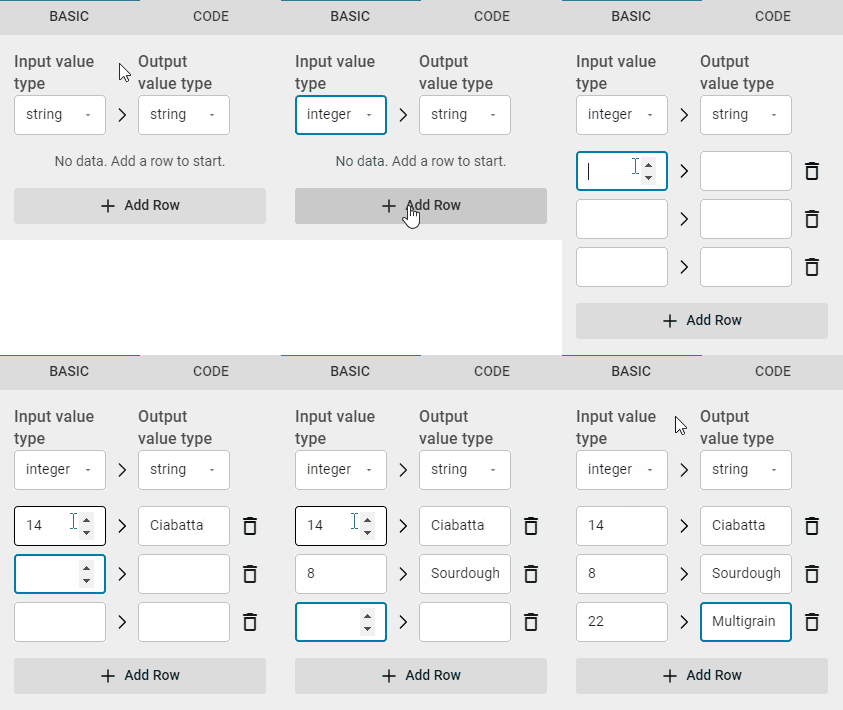
A lookup table of key-value pairs. Configured as a JSON array of objects:
json
[
  { "key": "14", "value": "Ciabatta" },
  { "key": "8", "value": "Sourdough" },
  { "key": "22", "value": "Multigrain" }
]
⚠️ Warning
If a value in the mapping cannot be converted to the configured Value type (e.g. the string "abc" with value type integer), the node raises an error.
Example
Assign priority scores to defect types
An AI model detects defects and outputs class names. You want to convert these into numerical priority codes for a downstream database or alert system.
Configuration:
- Key type:
string - Value type:
integer - Mapping:json
[
  { "key": "crack", "value": "1" },
  { "key": "scratch", "value": "2" },
  { "key": "discoloration", "value": "3" }
]
Result: When the node receives the string "crack", it outputs the integer 1. If it receives an unmapped class like "dust", no output is produced.
Related links
Reference:
- Custom Mapping — define a static key-value dictionary as a node output
- Get Value from Mapping — look up a value from a mapping data type
- Condition — route data based on a Boolean condition
- Boolean to Text — convert Boolean values to custom text labels