
Appearance
GRPC error when running a deployment
Symptoms
You may experience this issue if:
- You see a GRPC error in the notifications when running a deployment.
- You recently changed a model in your flow to a different model that expects a different input resolution.
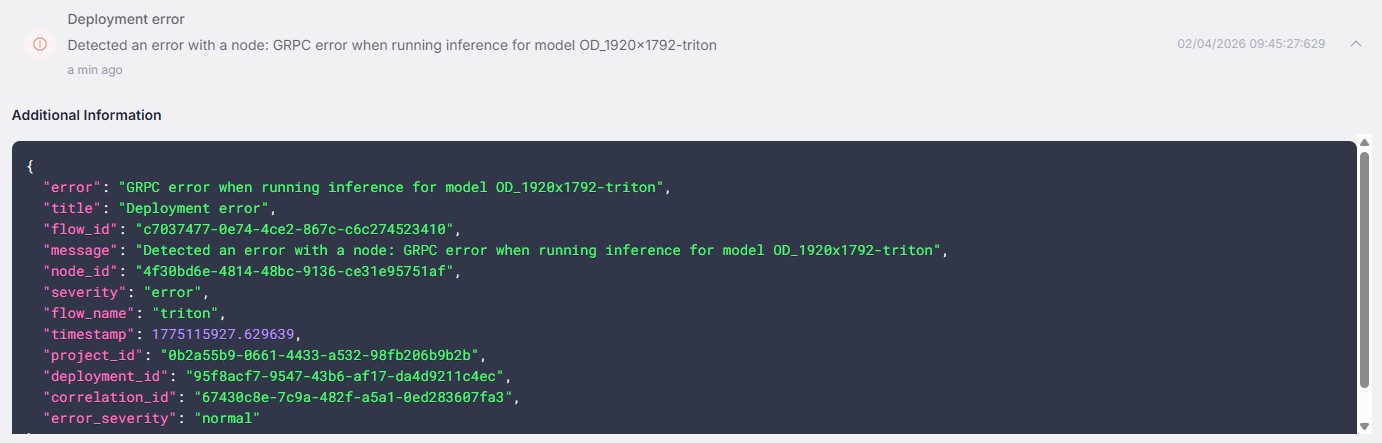
Error message:
Detected an error with a node: GRPC error when running inference for model <model_name>Causes
This issue can occur when you have a flow with one model and then replace it with a different model that expects a different input resolution.
The connections between nodes in the flow were not updated to reflect the new model's input requirements. FORXAI Video Vision (FVV) does not automatically validate the flow when you swap models — the existing connections remain unchanged even if they are no longer compatible.
Solutions
Refresh the flow to trigger validation
Refreshing the Flow Builder page forces FVV to revalidate the connections and highlight any incompatible ones.
Open the affected flow in Flow Builder.
Refresh the browser page (press F5).
After the page reloads, invalid connections are highlighted in red.
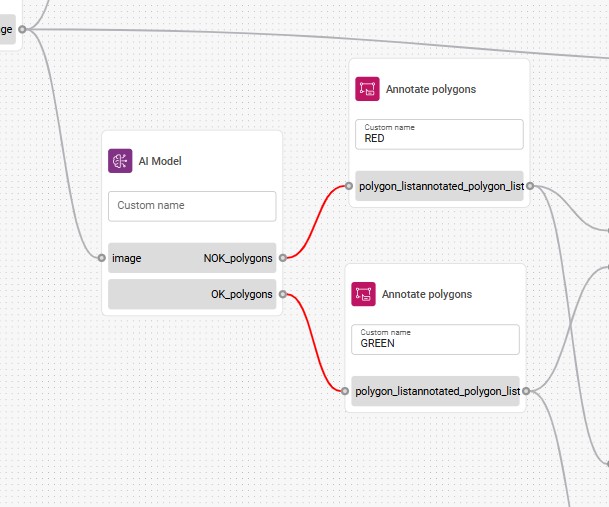
Red connections in Flow Builder indicating incompatible nodes. Delete the invalid (red) connections.
Reconnect the nodes with the correct configuration that matches the new model's expected input resolution.
Expected result: The flow has valid connections and the deployment runs without GRPC errors.