
Appearance
Too many notifications
Symptoms
You may experience this issue if:
- Your deployment is producing too many notifications.
- You are unable to copy the content of a specific notification for the KM representative.
- The notification panel is overwhelmed with entries.
Causes
This issue can occur when:
- A deployment is continuously pushing images, generating a high volume of notifications.
- When you are searching for a specific notification and the notification panel is filled with entries.
Solutions
Stop the deployment
Stopping the deployment prevents new notifications from being generated, allowing you to review existing ones.
Go to the Deployments page.

Deployments page with the Start/Stop button. Click Stop on the deployment that is generating the notifications.
Find the notification you need and copy its content.
Expected result: No new notifications are generated and you can review existing notifications at your own pace.
Filter notifications using the "Unseen only" toggle
If you don't want to stop the deployment, you can filter notifications to only show unread ones.
- Click the notification icon in the top right corner of the Hub.
- In the notification panel, enable the Unseen only toggle to filter out notifications you have already seen.
- Find the notification you need and copy its content.
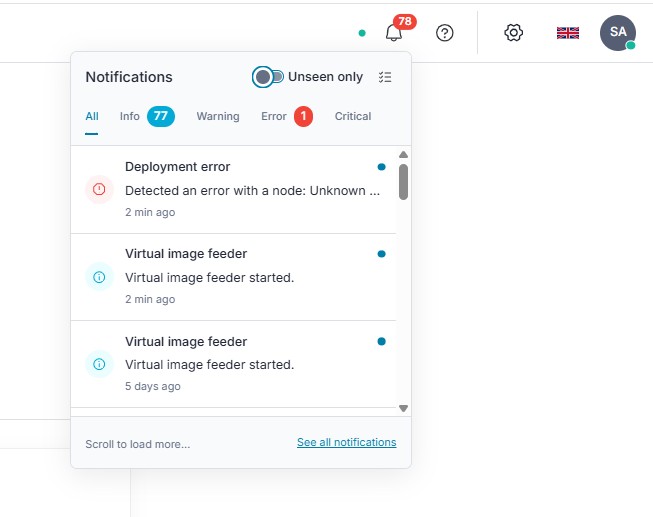
Expected result: The notification panel shows only unseen notifications, making it easier to find the one you need.