
Appearance
Failed to load or download model
Symptoms
You may experience this issue if you see:
RuntimeErrorwhen starting (running) a deployment — not during model training or model deployment to the Local Model Store.MalformedModelErrorwhen downloading a model from the remote Zoo.

Another symptom is a MalformedModelError visible in the Models page in the Builder or in the Hub:

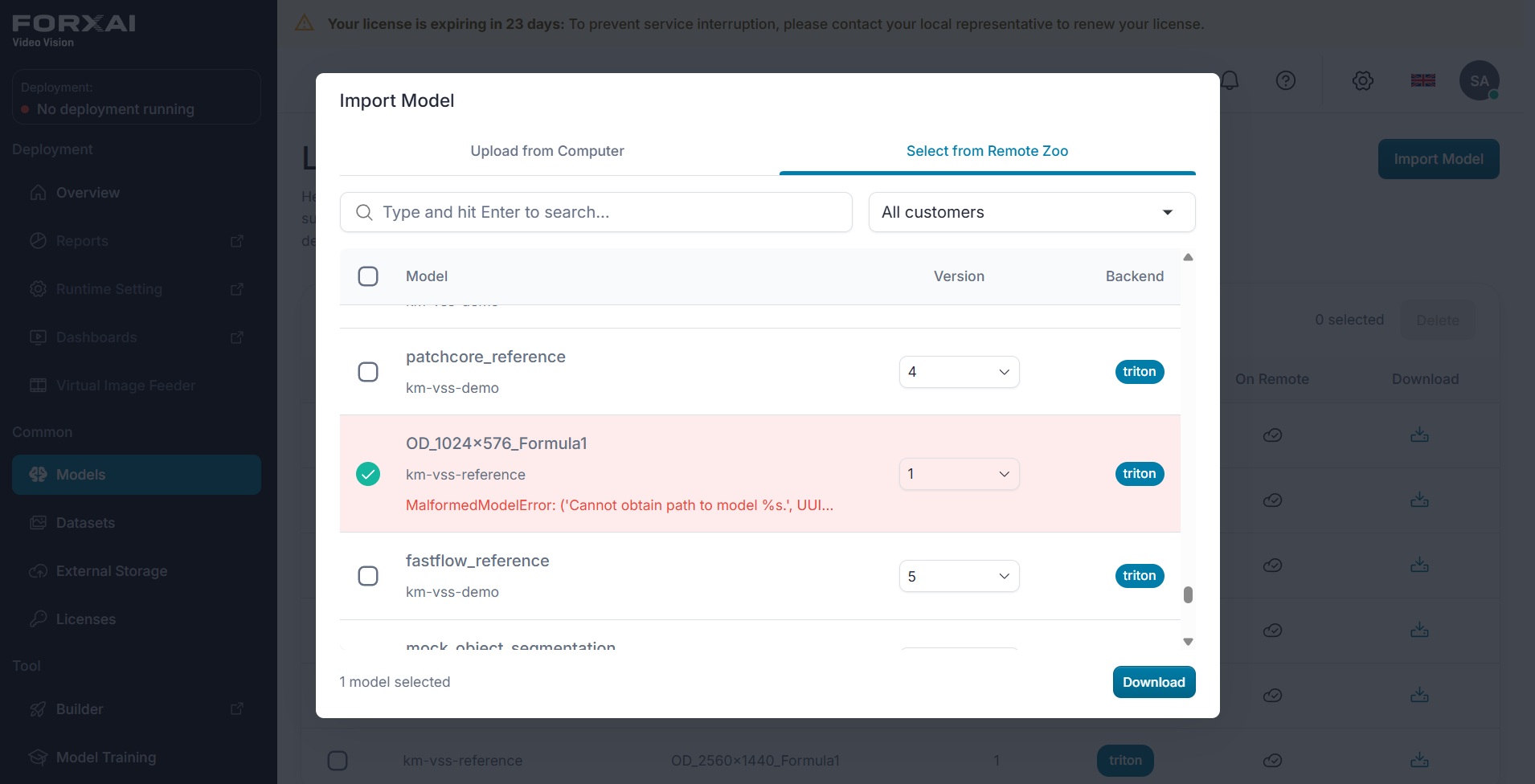
Error messages:
text
RuntimeError: Failed to deploy model: ('Cannot obtain path to model %s, <modelID>')text
MalformedModelError: ('Cannot obtain path to model %s.', UUID('<modelID>'))Terminology note
The error message uses "deploy" in the sense of loading a model into the running deployment, not in the sense of deploying a trained model to the Local Model Store. This error occurs when you click Start on a deployment and the platform tries to load the models referenced by your flows.
Causes
This issue can occur when the model import process was interrupted. For example, refreshing the browser during the import might create an inconsistent state where the model data is incomplete or corrupted.
Solutions
Contact Konica Minolta representative
This error indicates an inconsistent model state that cannot be resolved through the FORXAI Video Vision (FVV) user interface.
Contact your Konica Minolta representative and provide:
- The name of the affected model.
- The name of the deployment where the error occurred.
- A screenshot of the error message.
- Identifier of the affected server.