
Appearance
 Resize Polygons
Resize PolygonsOverview
Scales a list of polygons from their center point. This node is useful for enlarging or shrinking detection areas, such as expanding a face detection region to include more background.
Use Resize Polygons when:
- You need to increase the area of detected polygons for better cropping.
- You want to shrink polygons to focus on the core region of interest.
💡 Tip
Setting a factor above 100% enlarges the polygon, while setting it below 100% shrinks it.
Inputs
| Name | Type | Description |
|---|---|---|
| polygons | list[polygon] | The list of polygons to be scaled. |
Outputs
| Name | Type | Description |
|---|---|---|
| scaled_polygons | list[polygon] | The resulting list of resized polygons. |
Parameters
| Parameter | Default | Valid values | Unit | Tunable |
|---|---|---|---|---|
| Horizontal scale | 100 | 5 – 1000 | % | ✅ |
| Vertical scale | 100 | 5 – 1000 | % | ✅ |
Horizontal scale
The scaling factor applied to the horizontal dimension of each polygon. Values greater than 100% enlarge the polygon, values below 100% shrink it. The polygon is resized from its center.
Vertical scale
The scaling factor applied to the vertical dimension of each polygon. Values greater than 100% enlarge the polygon, values below 100% shrink it. The polygon is resized from its center.
Example
Enlarge detection regions
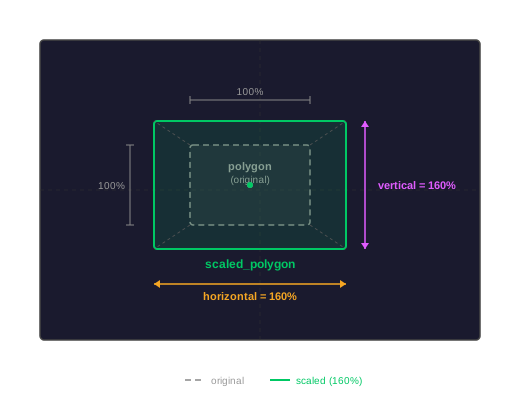
A model detects objects but the bounding boxes are too tight. Scaling both factors to 160% provides more context.
Configuration:
- Horizontal scale:
160 - Vertical scale:
160
Result: Each polygon in the list is 60% larger than the original.
Related links
Reference:
- Merge Polygons — combines multiple polygon lists into one
- Move Polygon — shifts a polygon's position