
Appearance
 Move Polygon
Move PolygonOverview
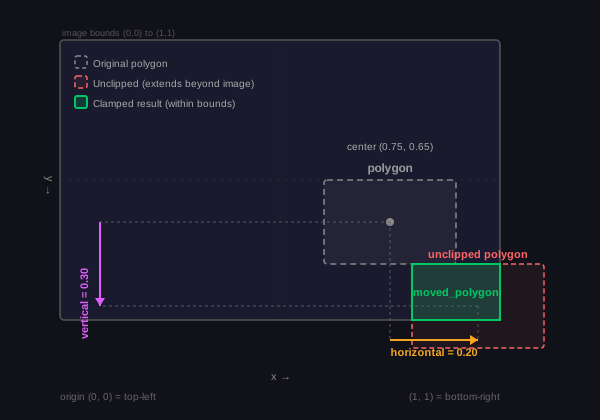
The Move Polygon node moves a polygon by adding horizontal and vertical offsets to every point. All coordinates are normalized (0 – 1), and each moved point is clipped so it never leaves the image boundaries.
Use Move Polygon when:
- You need to shift a detected region based on a dynamic offset (e.g. a calculated distance or sensor value).
💡 Tip
Negative offsets move the polygon left (horizontal) or up (vertical). The node clamps each point individually, so a polygon near the edge may change shape rather than disappear.
Inputs
| Name | Type | Description |
|---|---|---|
| polygon | polygon | The polygon to move. |
| horizontal | number | Offset along the x-axis (normalized). Positive moves right, negative moves left. |
| vertical | number | Offset along the y-axis (normalized). Positive moves down, negative moves up. |
⚠️ Warning
All three inputs are required.
Outputs
| Name | Type | Description |
|---|---|---|
| moved_polygon | polygon | The translated polygon, with every point clipped to 0 – 1. |
ℹ️ Note
Point and polygon probability values are preserved through the polygon move.
Parameters
This node has no configurable parameters.
Example
Shifting a detection region
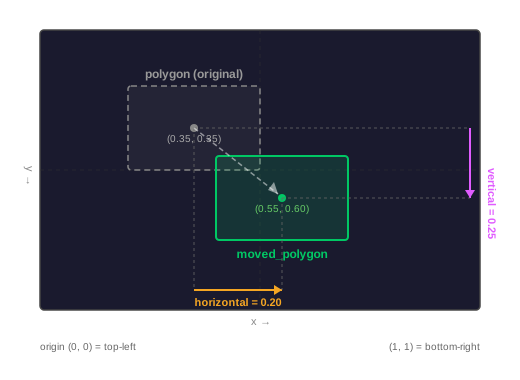
A model detects an object and outputs a bounding polygon. A downstream calculation determines that the region of interest is offset 0.20 to the right and 0.25 downward from the detection. The Move Polygon node applies these offsets to reposition the polygon.
Related links
Reference:
- Resize Polygons — scales a polygon around its center
- Polygon Distance — computes distance between two polygon centers
- Polygon ROI — filters predictions by region of interest