
Appearance
Node errors after importing a project
Symptoms
You may experience this issue if:
- When you start a deployment, you see node-related errors.
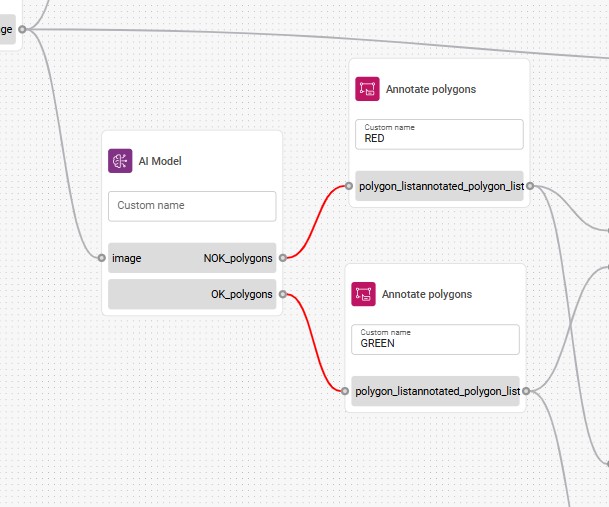
- In Flow Builder, some node connections are highlighted in red, indicating they are no longer valid.

Causes
This issue can occur when the imported project was created in an older FVV version that used nodes that have since been changed or replaced in the current version.
Solutions
Check for breaking changes and replace invalid nodes
- Check the release notes for any breaking changes between your previous FVV version and the current one.
- Open the affected flow in Flow Builder.
- Look for connections highlighted in red — these indicate invalid or incompatible nodes.
- Delete the broken node.
- Add a new instance of the same node type from the node palette.
- Reconnect the new node to the flow.
- Repeat for all nodes with red connections.
- Save the flow and start the deployment.
Expected result: The flow has valid connections with updated nodes and the deployment starts without errors.
If the problem persists
If the deployment still fails after replacing the invalid nodes:
Collect the following information:
- FVV version number (both the previous version and the current one).
- The exact error message or screenshot.
- Exported project file.
- Identifier of the affected server.
Contact your Konica Minolta representative for assistance.