
Appearance
 Track Objects
Track ObjectsOverview
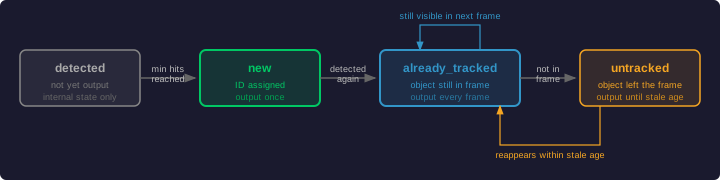
Tracks objects across consecutive frames using the SORT (Simple Online and Realtime Tracking) algorithm. This node assigns IDs to detected polygons and categorizes them as new, already tracked, or lost.
Use Track Objects when:
- You need to count unique items passing through a field of view (e.g., on a conveyor belt).
Inputs
| Name | Type | Description |
|---|---|---|
| polygons | list[polygon] | The list of polygons detected in the current frame. |
Outputs
| Name | Type | Description |
|---|---|---|
| already_tracked | list[polygon] | Objects that were already identified in previous frames. |
| untracked | list[polygon] | Objects that were previously tracked but are missing in the current frame. |
| new | list[polygon] | Objects detected for the first time after meeting the minimum hits threshold. |
Parameters
| Parameter | Default | Valid values | Unit | Tunable |
|---|---|---|---|---|
| Maximum stale track age | 10.0 | > 0 | s | ✅ |
| Minimum detection hits | 2 | ≥ 2 | hits | ✅ |
| Maximum prediction distance difference | 0.1 | > 0, < √2 (≈ 1.41) | relative | ✅ |
| Enable automatic state reset | false | true, false | — | — |
Maximum stale track age
The time after which an object will stop being tracked if it leaves the detection area. If the object returns after this time, it will be registered as a new object. This prevents false re-identifications in scenarios where objects may re-enter the field of view (e.g. a conveyor belt that moves in both directions).
Minimum detection hits
How many times an object needs to be detected before it is considered tracked and output on the new port. Until this threshold is reached the detection is kept as internal state only. For example, with a value of 3, the first two detections categorize the object as internal state, and the third detection switches it to new.
Maximum prediction distance difference
The tracker predicts where each object will appear based on its previous trajectory. This parameter sets the maximum allowed distance between the predicted position and the actual detection. Values are normalized to the frame dimensions ([0, 1]), so 0.2 means the actual position may differ by up to 20 % of the image width or height. The theoretical maximum is √2 ≈ 1.414 (corner-to-corner diagonal). Keeping this value low helps avoid false matches caused by detections jumping to unrelated positions.
Enable automatic state reset
When enabled, the node resets its internal tracking state when the flow requests it. This clears all active tracks and assigned IDs, so every object will be treated as newly detected after the reset.
Example
Track items on a conveyor
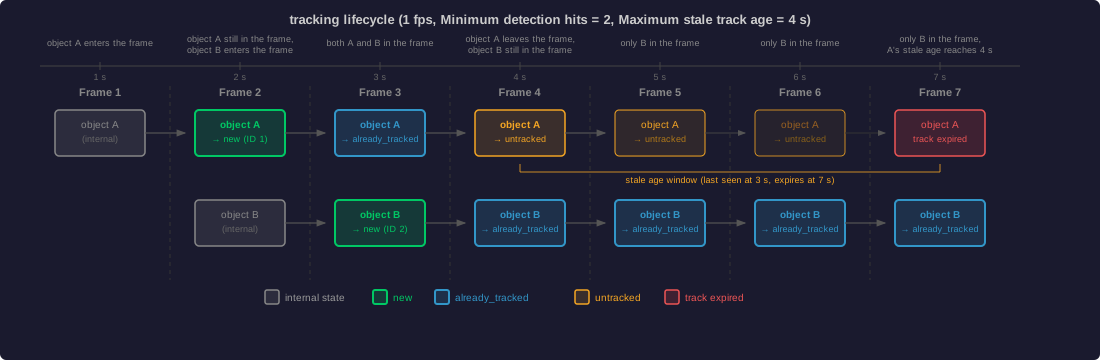
Items pass under a camera. An object must be seen twice before being counted.
Configuration:
- Minimum detection hits:
2 - Maximum stale track age:
4.0
Result: The first detection is internal state only. The second detection outputs the polygon on the new port. Subsequent detections output on already_tracked. When the object disappears, it is output on untracked until the Maximum stale track age expires.
Related links
Reference:
- Count Polygons — counts the current frame's detections
External:
- SORT: Simple Online and Realtime Tracking — the algorithm used by this node (Bewley et al., 2016)